Getting Started · chapter 3 of 9 · ● ● ● ○ ○ ○ ○ ○ ○
3 · Hello, TestLab: your first test, by hand
Goal: write one small test yourself, see it pass, then see it fail. No AI yet. Time: 15 minutes
The service you test
The hello service is a tiny API. Its address is in box B of your handout.
| Call | Answers |
|---|---|
GET /hello |
{"message": "Hello, Tractus-X!"} |
GET /parts |
The parts P-1001 and P-1002 |
GET /parts/{partId} |
That part, or 404 |
GET /health |
{"status": "UP"} |
Full specification (OpenAPI)
openapi: 3.0.3
info:
  title: Hello service
  version: "1.0.0"
  description: >
    A tiny read-only API for the first test of the Eclipse Tractus-X E2E testing
    tutorial. It says hello and knows two parts. Every answer is JSON, errors
    included.
  license:
    name: Apache-2.0
    url: https://www.apache.org/licenses/LICENSE-2.0
servers:
  - url: /
paths:
  /hello:
    get:
      summary: Say hello
      operationId: sayHello
      responses:
        "200":
          description: The greeting.
          content:
            application/json:
              schema: { $ref: "#/components/schemas/Greeting" }
              example: { message: "Hello, Tractus-X!" }
  /parts:
    get:
      summary: List the parts
      operationId: listParts
      responses:
        "200":
          description: Every part the service knows.
          content:
            application/json:
              schema:
                type: array
                items: { $ref: "#/components/schemas/PartSummary" }
  /parts/{partId}:
    get:
      summary: Read one part
      operationId: getPart
      parameters:
        - name: partId
          in: path
          required: true
          schema: { type: string, example: P-1001 }
      responses:
        "200":
          description: The part.
          content:
            application/json:
              schema: { $ref: "#/components/schemas/Part" }
              example: { partId: P-1001, name: Brake disc, manufacturerPartId: BD-4711, weightKg: 7.2 }
        "404":
          description: No part with this id.
          content:
            application/json:
              schema: { $ref: "#/components/schemas/Problem" }
  /health:
    get:
      summary: Is the service up?
      operationId: health
      responses:
        "200":
          description: The service is up.
          content:
            application/json:
              schema:
                type: object
                properties:
                  status: { type: string, example: UP }
components:
  schemas:
    Greeting:
      type: object
      required: [message]
      properties:
        message: { type: string }
    PartSummary:
      type: object
      required: [partId, name]
      properties:
        partId: { type: string }
        name: { type: string }
    Part:
      type: object
      required: [partId, name, manufacturerPartId, weightKg]
      properties:
        partId: { type: string }
        name: { type: string }
        manufacturerPartId: { type: string }
        weightKg: { type: number }
    Problem:
      type: object
      required: [status, title]
      properties:
        status: { type: integer }
        title: { type: string }
        detail: { type: string }
Not at the workshop? Run it with Docker as its
README
shows, at http://localhost:8080.
The test
kind: test
syntax: v1-alpha

namespace: hello-e2e
id: says-hello

metadata:
  name: "The service says hello"
  version: "v0.1.0"
  description: Calls GET /hello and checks the greeting.

execution:
  - id: say_hello
    uses: http/http_request
    name: Ask the service to say hello
    with:
      url: "${{ env.service_url }}/hello"
    returns:
      status_code:
        type: integer
      body:
        type: object
    validate:
      - uses: validate/assert
        with: { input: status_code, operator: equals, value: 200 }
      - uses: validate/field
        with: { input: body, path: message, operator: equals, value: "Hello, Tractus-X!" }
usespicks the action: one HTTP request.withgives its inputs.${{ env.service_url }}is the address, taken from the manifest.returnsnames the outputs you check.validateholds the checks. The step passes only if all of them hold.
The syntax cheat sheet explains every part.
Steps
-
Install TestLab (Python 3.12+) and the VS Code extension YAML by Red Hat:
-
Unpack
hello-start.zipinto a folderhelloand open it in VS Code. - In
index.yaml, setservice_urlto the address on your handout. -
Create
tests/says_hello.yamlwith the test above. Its first line turns on autocomplete: -
In
index.yaml, replacetests: []with: -
Run:
- Open the Test Suite (box B) and click the Test Suite IDE icon on the left.
-
Click Open File and choose
hello-start.zip.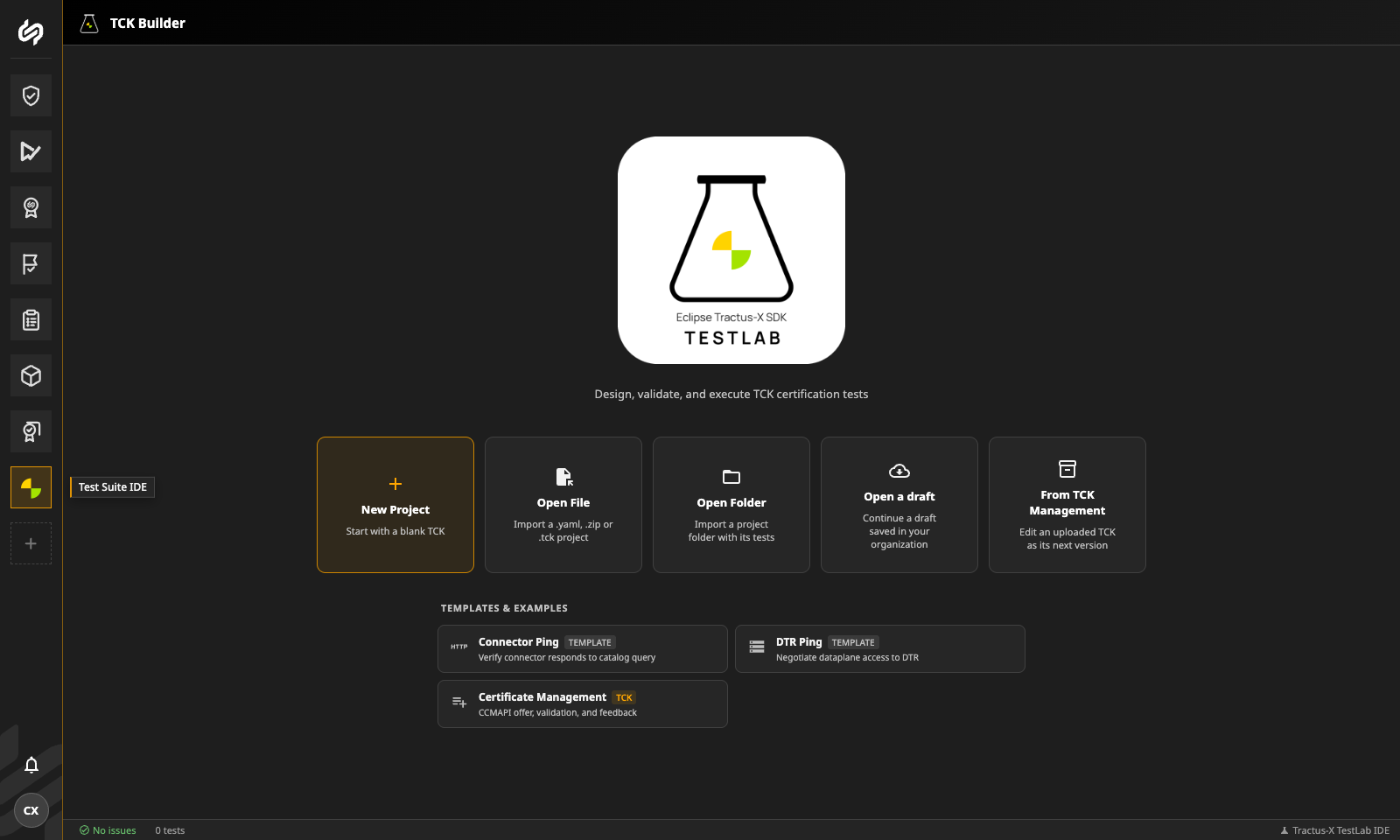
-
☰ → Environment → Variables →
service_url: enter the address on your handout. - New ▾ → New Test, then click
new-test.yaml. -
Open the YAML Editor at the right edge, click Edit, paste the test, click Save. The blocks appear.
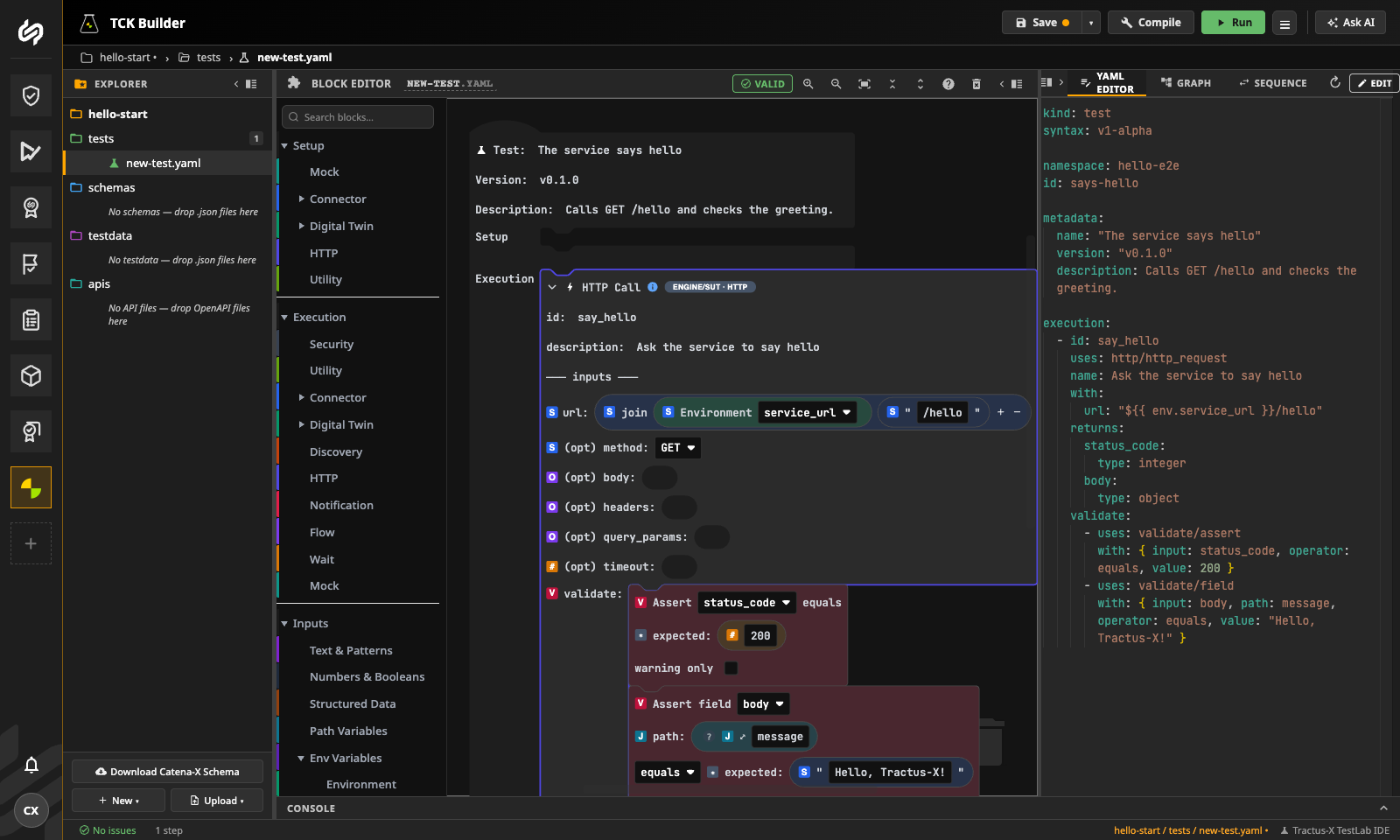
-
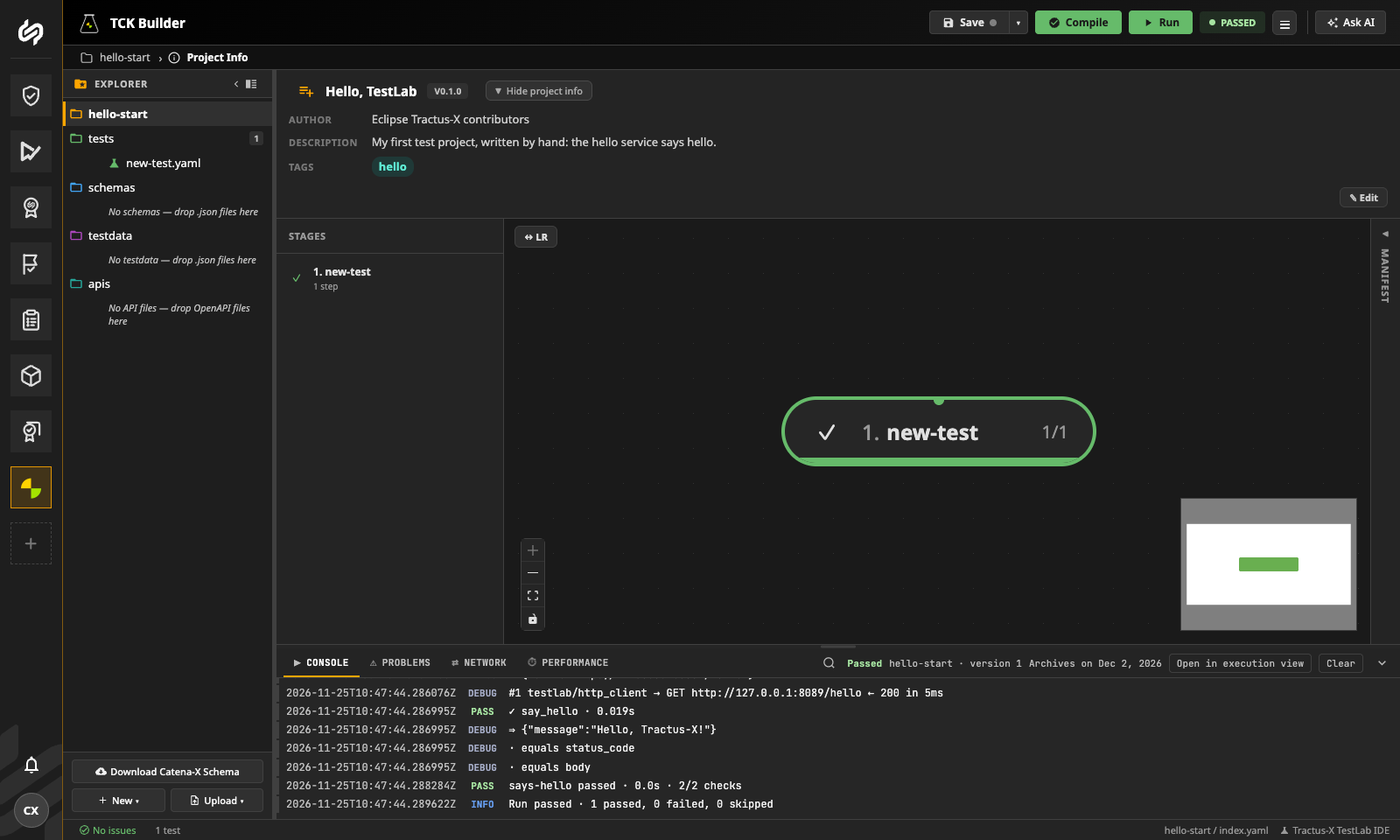
Click Compile, then Run. Save the draft, and click Run again if it does not start. Pick any app under test (or Register an app), click Next to the end, then Run.
More on every button: The Test Suite IDE.
You should now see
Make it fail
- Change the expected greeting to
Hello, world!and run. It fails withExpected 'Hello, world!', got 'Hello, Tractus-X!'. - Change it back. Green again.
Your turn
Write tests/unknown_part_is_not_found.yaml: ask for part P-9999, expect 404.
Register it and run.
Solution
kind: test
syntax: v1-alpha

namespace: hello-e2e
id: unknown-part-is-not-found

metadata:
  name: "An unknown part is not found"
  version: "v0.1.0"
  description: Negative test. Asks for a part the service does not know.

execution:
  - id: read_unknown_part
    uses: http/http_request
    name: Ask for a part that does not exist
    with:
      url: "${{ env.service_url }}/parts/P-9999"
    returns:
      status_code:
        type: integer
    validate:
      - uses: validate/assert
        with: { input: status_code, operator: equals, value: 404 }
More time? Check the shape of a part
kind: test
syntax: v1-alpha

namespace: hello-e2e
id: reads-a-part

metadata:
  name: "A part has the shape the specification promises"
  version: "v0.1.0"
  description: Contract test. Reads part P-1001 and checks it against the Part schema.

execution:
  - id: read_part
    uses: http/http_request
    name: Read part P-1001
    with:
      url: "${{ env.service_url }}/parts/P-1001"
    returns:
      status_code:
        type: integer
      body:
        type: object
    validate:
      - uses: validate/assert
        with: { input: status_code, operator: equals, value: 200 }
      - uses: validate/field
        with: { input: body, path: name, operator: equals, value: "Brake disc" }
      - uses: validate/schema
        with: { input: body, schema: "${{ env.schemas.part }}" }
The finished project is in
examples/hello.
Tip
Stuck? YAML error: check the indentation (two spaces, no tabs). Service unreachable:
open <address>/health in the browser. No blocks in the IDE: click Save in the YAML
editor.
NOTICE
This work is licensed under the CC-BY-4.0.
- SPDX-License-Identifier: CC-BY-4.0
- SPDX-FileCopyrightText: 2026 Contributors to the Eclipse Foundation
- SPDX-FileCopyrightText: 2026 Catena-X Automotive Network e.V.
- SPDX-FileCopyrightText: 2026 LKS Next
- Source URL: https://github.com/eclipse-tractusx/tutorial-resources
 matbmoser
 CDiezRodriguez