File Transfer: Amazon S3 to Amazon S3
Deprecated
This tutorial is kept for reference. It may not match the current Eclipse Tractus-X release. All tutorials
1. Description
This tutorial illustrates the process through which a provider participant can transfer a file stored in its Amazon S3 to another Amazon S3 belonging to a consumer participant.
For this tutorial, we assume Alice as a provider participant and Bob as consumer participant.
We use a self-contained version of Amazon S3 named MinIO, and we deploy two instances, one each for Alice and Bob.
2. Existing Resources
Following resources have already been configured.
| Resource | Alice | Bob | Description |
|---|---|---|---|
| AWS Access Key Id | aliceawsclient | bobawsclient | Configured AWS access id in MinIO |
| AWS Secret Access Key | aliceawssecret | bobawssecret | Configured AWS secret access key in MinIO |
| S3 Bucket Name | alice-bucket | bob-bucket | An S3 bucket created for demonstration purpose |
| Sample File | alice-test-document.txt | bob-test-document.txt | A sample file already uploaded in the bucket |
3. Connect to MinIO
To access MinIO locally we need to expose the port outside our kubernetes cluster.
MinIO contains a web interface called MinIO Console, so we will expose its port as well.
3.1 Connect to Alice's MinIO
Now, navigate to http://localhost:9001 and login with Alice's access key id and secret access key. You should be able to see MinIO Console.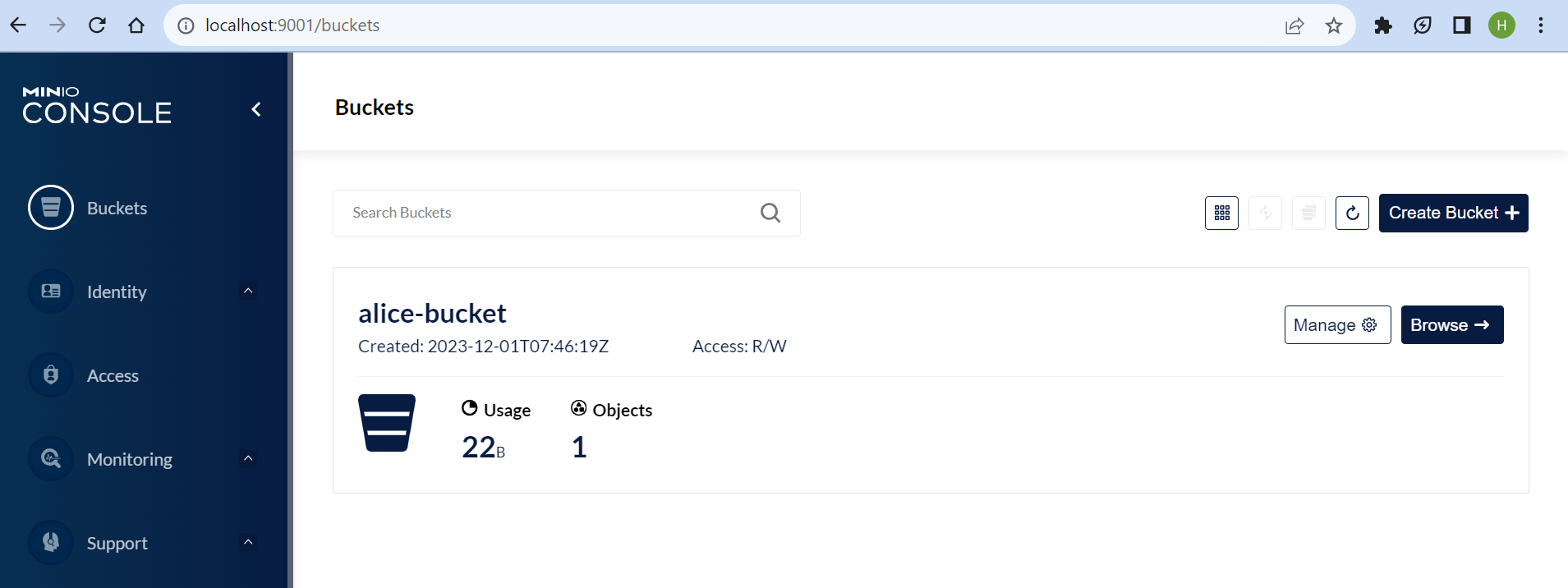
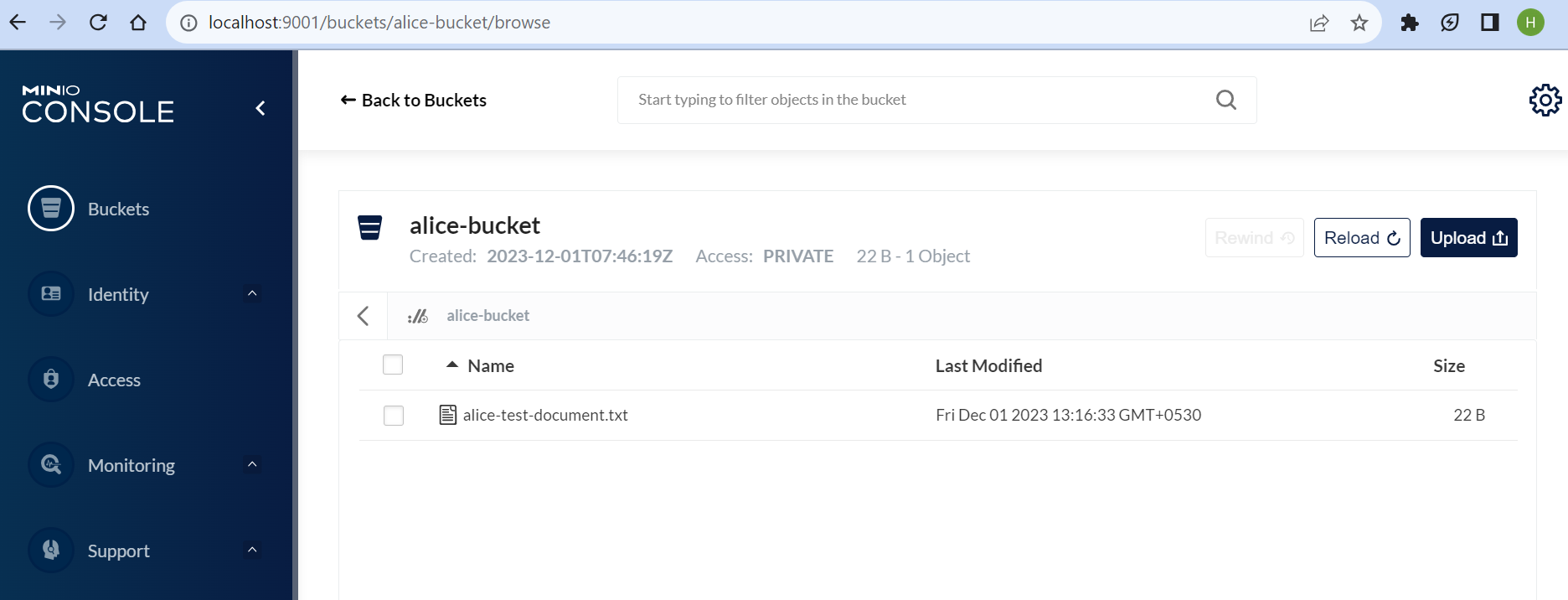
If you click on Browse, you can see the files stored in alice-bucket.
3.2 Connect to Bob's MinIO
Similarly, you can access Bob's MinIO as well. Open a new terminal and run below command.
Now, navigate to http://localhost:8001 and login with Bob's access key id and secret access key.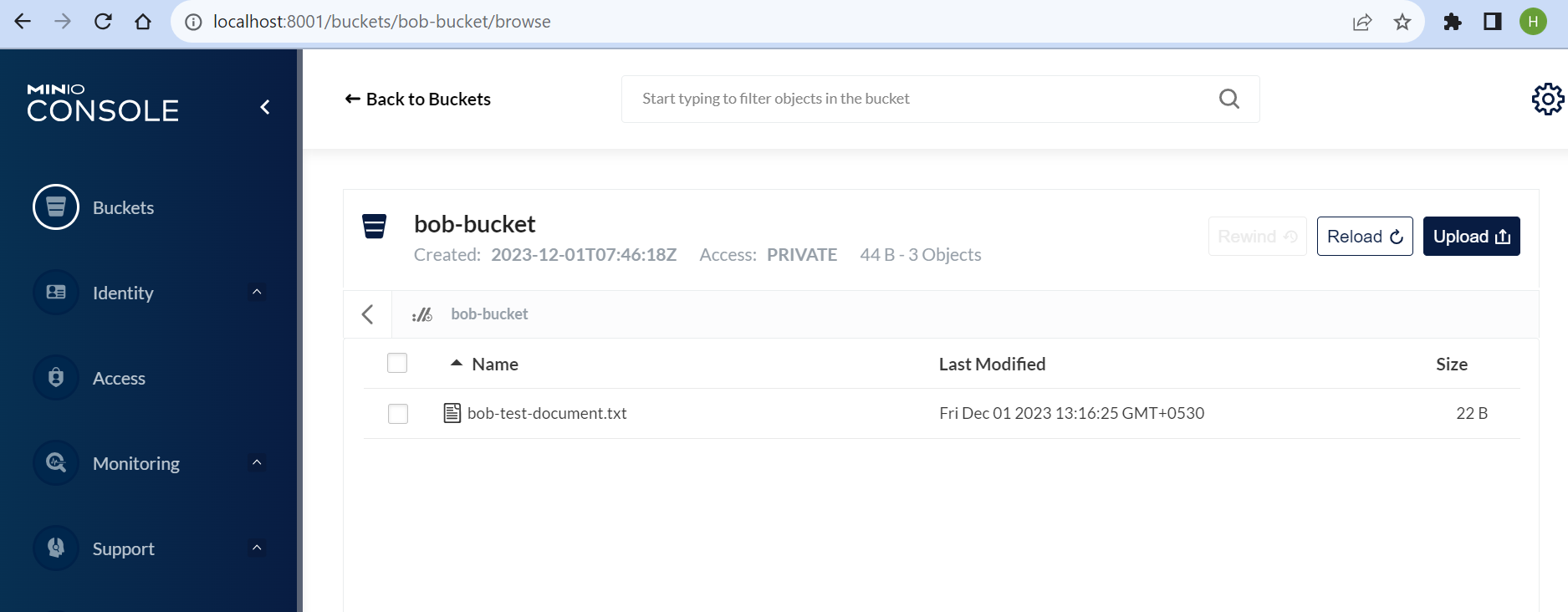
4. Upload file in Alice's MinIO
You can skip this step entirely if you want to use existing uploaded files.
We can upload files either via MinIO Console or AWS CLI.
4.1 Via MinIO Console
- Open Alice's MinIO Console via following steps mentioned in previous step.
Browsecontent of the bucketalice-bucket.- Click on
Uploadbutton and select any sample file to upload.
4.2 Via AWS CLI
Let's configure AWS CLI with Alice's credentials.
When prompted, enter Alice's access key id / secret.Now, you can upload file using below command.
aws s3 cp assets/test-document.txt s3://alice-bucket/another-test-document.txt --endpoint-url http://localhost:9000
5. Create S3 Asset
While creating asset, we need to provide file name, S3 bucket name and AWS region where it is stored.
curl --location 'http://localhost/alice/management/v3/assets' \
--header 'Content-Type: application/json' \
--header 'X-Api-Key: password' \
--data-raw '{
  "@context": {},
  "@id": "20",
  "properties": {
    "name": "alice-test-document",
    "description": "Product EDC Demo S3 Asset",
    "contenttype": "text/plain",
    "version": "1.0"
  },
  "dataAddress": {
    "@type": "DataAddress",
    "type": "AmazonS3",
    "keyName": "alice-test-document.txt",
    "region": "us-east-1",
    "bucketName": "alice-bucket"
  }
}'
6. Create Policy
6.1 Create Access Policy
curl --location 'http://localhost/alice/management/v2/policydefinitions' \
--header 'Content-Type: application/json' \
--header 'X-Api-Key: password' \
--data-raw '{
  "@context": {
    "odrl": "http://www.w3.org/ns/odrl/2/"
  },
  "@type": "PolicyDefinitionRequestDto",
  "@id": "201",
  "policy": {
    "@type": "odrl:Set",
    "odrl:permission": [
      {
        "odrl:action": "USE",
        "odrl:constraint": {
          "@type": "LogicalConstraint",
          "odrl:or": [
            {
              "@type": "Constraint",
              "odrl:leftOperand": "BpnCredential",
              "odrl:operator": {
                "@id": "odrl:eq"
              },
              "odrl:rightOperand": "active"
            }
          ]
        }
      }
    ]
  }
}'
6.2 Create Contract Policy
curl --location 'http://localhost/alice/management/v2/policydefinitions' \
--header 'Content-Type: application/json' \
--header 'X-Api-Key: password' \
--data-raw '{
  "@context": {
    "odrl": "http://www.w3.org/ns/odrl/2/"
  },
  "@type": "PolicyDefinitionRequestDto",
  "@id": "202",
  "policy": {
    "@type": "odrl:Set",
    "odrl:permission": [
      {
        "odrl:action": "USE",
        "odrl:constraint": {
          "@type": "LogicalConstraint",
          "odrl:or": [
            {
              "@type": "Constraint",
              "odrl:leftOperand": "BusinessPartnerNumber",
              "odrl:operator": {
                "@id": "odrl:eq"
              },
              "odrl:rightOperand": "BPNL000000000002"
            }
          ]
        }
      }
    ]
  }
}'
7. Create Contract Definition
curl --location 'http://localhost/alice/management/v2/contractdefinitions' \
--header 'Content-Type: application/json' \
--header 'X-Api-Key: password' \
--data-raw '{
  "@context": {},
  "@id": "20",
  "@type": "ContractDefinition",
  "accessPolicyId": "201",
  "contractPolicyId": "202",
  "assetsSelector": {
    "@type": "CriterionDto",
    "operandLeft": "https://w3id.org/edc/v0.0.1/ns/id",
    "operator": "=",
    "operandRight": "20"
  }
}'
8. Query Catalog
Now let's verify whether Bob is able to access the assets or not via querying Alice's catalog.
curl --location 'http://localhost/bob/management/v2/catalog/request' \
--header 'Content-Type: application/json' \
--header 'X-Api-Key: password' \
--data-raw '{
  "@context": {
    "edc": "https://w3id.org/edc/v0.0.1/ns/"
  },
  "@type": "CatalogRequest",
  "counterPartyAddress": "http://alice-controlplane:8084/api/v1/dsp",
  "protocol": "dataspace-protocol-http",
  "querySpec": {
    "offset": 0,
    "limit": 50
  }
}'
You should be able to find this asset (id: 20) in the list of catalog returned by Alice.
{
  "@id": "9c1fc97a-5fcc-49f5-b56a-c78b21ca1f82",
  "@type": "dcat:Catalog",
  "dcat:dataset": [
    {
      "@id": "20",
      "@type": "dcat:Dataset",
      "odrl:hasPolicy": {
        "@id": "MjA=:MjA=:YWNjNGRkZjctMjZiYS00ZDlmLTkzNDEtNDUyZmViYTlmZjE3",
        "@type": "odrl:Set",
        "odrl:permission": {
          "odrl:target": "20",
          "odrl:action": {
            "odrl:type": "USE"
          },
          "odrl:constraint": {
            "odrl:or": {
              "odrl:leftOperand": "BusinessPartnerNumber",
              "odrl:operator": {
                "@id": "odrl:eq"
              },
              "odrl:rightOperand": "BPNL000000000002"
            }
          }
        },
        "odrl:prohibition": [],
        "odrl:obligation": [],
        "odrl:target": {
          "@id": "20"
        }
      },
      "dcat:distribution": [
        {
          "@type": "dcat:Distribution",
          "dct:format": {
            "@id": "HttpProxy"
          },
          "dcat:accessService": "07d469e1-f1be-459b-a69d-ed16fd1fec3e"
        },
        {
          "@type": "dcat:Distribution",
          "dct:format": {
            "@id": "AmazonS3"
          },
          "dcat:accessService": "07d469e1-f1be-459b-a69d-ed16fd1fec3e"
        }
      ],
      "version": "1.0",
      "name": "alice-test-document",
      "description": "Product EDC Demo S3 Asset",
      "id": "20",
      "contenttype": "text/plain"
    }
  ],
  "dcat:service": {},
  "participantId": "BPNL000000000001",
  "@context": {}
}
Please take a note of
odrl:hasPolicy#@id(MjA=:MjA=:YWNjNGRkZjctMjZiYS00ZDlmLTkzNDEtNDUyZmViYTlmZjE3) field in the response which will be used while initiating negotiation.
9. Initiate Negotiation
Please update offerId in the below curl request from the above step.
curl --location 'http://localhost/bob/management/v2/contractnegotiations' \
--header 'Content-Type: application/json' \
--header 'X-Api-Key: password' \
--data-raw '{
  "@context": {
    "odrl": "http://www.w3.org/ns/odrl/2/"
  },
  "@type": "NegotiationInitiateRequestDto",
  "connectorAddress": "http://alice-controlplane:8084/api/v1/dsp",
  "protocol": "dataspace-protocol-http",
  "connectorId": "BPNL000000000001",
  "providerId": "BPNL000000000001",
  "offer": {
    "offerId": "<Odrl Policy ID From Above Step>",
    "assetId": "20",
    "policy": {
      "@type": "odrl:Set",
      "odrl:permission": {
        "odrl:target": "20",
        "odrl:action": {
          "odrl:type": "USE"
        },
        "odrl:constraint": {
          "odrl:or": [
            {
              "@type": "Constraint",
              "odrl:leftOperand": "BusinessPartnerNumber",
              "odrl:operator": {
                "@id": "odrl:eq"
              },
              "odrl:rightOperand": "BPNL000000000002"
            }
          ]
        }
      },
      "odrl:prohibition": [],
      "odrl:obligation": [],
      "odrl:target": "20"
    }
  }
}'
Above API should return below response.
{
  "@type": "IdResponse",
  "@id": "53668c69-106d-416c-8118-af23d171b938",
  "createdAt": 1701425299412,
  "@context": {
    "@vocab": "https://w3id.org/edc/v0.0.1/ns/",
    "edc": "https://w3id.org/edc/v0.0.1/ns/",
    "tx": "https://w3id.org/tractusx/v0.0.1/ns/",
    "odrl": "http://www.w3.org/ns/odrl/2/"
  }
}
Please take note of the negotiation id (
@idfield) in the response.
10. Get Negotiation
Now, we have initiated the negotiation. Let's try to inspect it.
Please update negotiation id in the below curl request.
curl --location 'http://localhost/bob/management/v2/contractnegotiations/<NEGOTIATION_ID>' \
--header 'X-Api-Key: password'
{
  "@type": "ContractNegotiation",
  "@id": "53668c69-106d-416c-8118-af23d171b938",
  "type": "CONSUMER",
  "protocol": "dataspace-protocol-http",
  "state": "FINALIZED",
  "counterPartyId": "BPNL000000000001",
  "counterPartyAddress": "http://alice-controlplane:8084/api/v1/dsp",
  "callbackAddresses": [],
  "createdAt": 1701425299412,
  "contractAgreementId": "48bad8fd-e24d-40e9-91d3-6d7f82693989",
  "@context": {}
}
statefield should beFINALIZED. If it isTERMINATED, it means negotiation has been failed. Please check logs for more details.- Take a note of
contractAgreementIdfield which will be used while initiating transfer.
11. Initiate Transfer
Please update contract agreement id from above step in the below curl request.
curl --location 'http://localhost/bob/management/v2/transferprocesses' \
--header 'Content-Type: application/json' \
--header 'X-Api-Key: password' \
--data-raw '{
  "@context": {
    "odrl": "http://www.w3.org/ns/odrl/2/"
  },
  "assetId": "20",
  "connectorAddress": "http://alice-controlplane:8084/api/v1/dsp",
  "connectorId": "BPNL000000000001",
  "contractId": "<Contract Agreement Id from Get Negotiation Response>",
  "dataDestination": {
    "type": "AmazonS3",
    "keyName": "alice-test-document.txt",
    "bucketName": "bob-bucket",
    "region": "us-east-1",
    "endpointOverride": "http://bob-minio:9000",
    "accessKeyId": "bobawsclient",
    "secretAccessKey": "bobawssecret"
  },
  "protocol": "dataspace-protocol-http"
}'
This API should return below response.
{
  "@type": "IdResponse",
  "@id": "40fdb511-68f2-453f-bd9b-8e5e728508aa",
  "createdAt": 1701425537697,
  "@context": {
    "@vocab": "https://w3id.org/edc/v0.0.1/ns/",
    "edc": "https://w3id.org/edc/v0.0.1/ns/",
    "tx": "https://w3id.org/tractusx/v0.0.1/ns/",
    "odrl": "http://www.w3.org/ns/odrl/2/"
  }
}
Please take note of the transfer process id (
@idfield) in the response.
12. Get Transfer
Just wait for few seconds and check the transfer state.
Please replace transfer process id before running command.
curl --location 'http://localhost/bob/management/v2/transferprocesses/<TRANSFER_PROCESS_ID>' \
--header 'X-Api-Key: password'
It should return below response:
{
  "@id": "40fdb511-68f2-453f-bd9b-8e5e728508aa",
  "@type": "TransferProcess",
  "correlationId": "40fdb511-68f2-453f-bd9b-8e5e728508aa",
  "state": "COMPLETED",
  "stateTimestamp": 1701425542142,
  "type": "CONSUMER",
  "assetId": "20",
  "contractId": "48bad8fd-e24d-40e9-91d3-6d7f82693989",
  "callbackAddresses": [],
  "dataDestination": {
    "@type": "DataAddress",
    "secretAccessKey": "bobawssecret",
    "accessKeyId": "bobawsclient",
    "endpointOverride": "http://bob-minio:9000",
    "region": "us-east-1",
    "type": "AmazonS3",
    "keyName": "alice-test-document.txt",
    "bucketName": "bob-bucket"
  },
  "connectorId": "BPNL000000000001",
  "@context": {}
}
Please note,
stateshould beCOMPLETED. If it isTERMINATED, it means, transfer has been failed. Please check logs for more details.
13. Validate Transfer
Now we can validate that file has been transferred to bob-bucket.
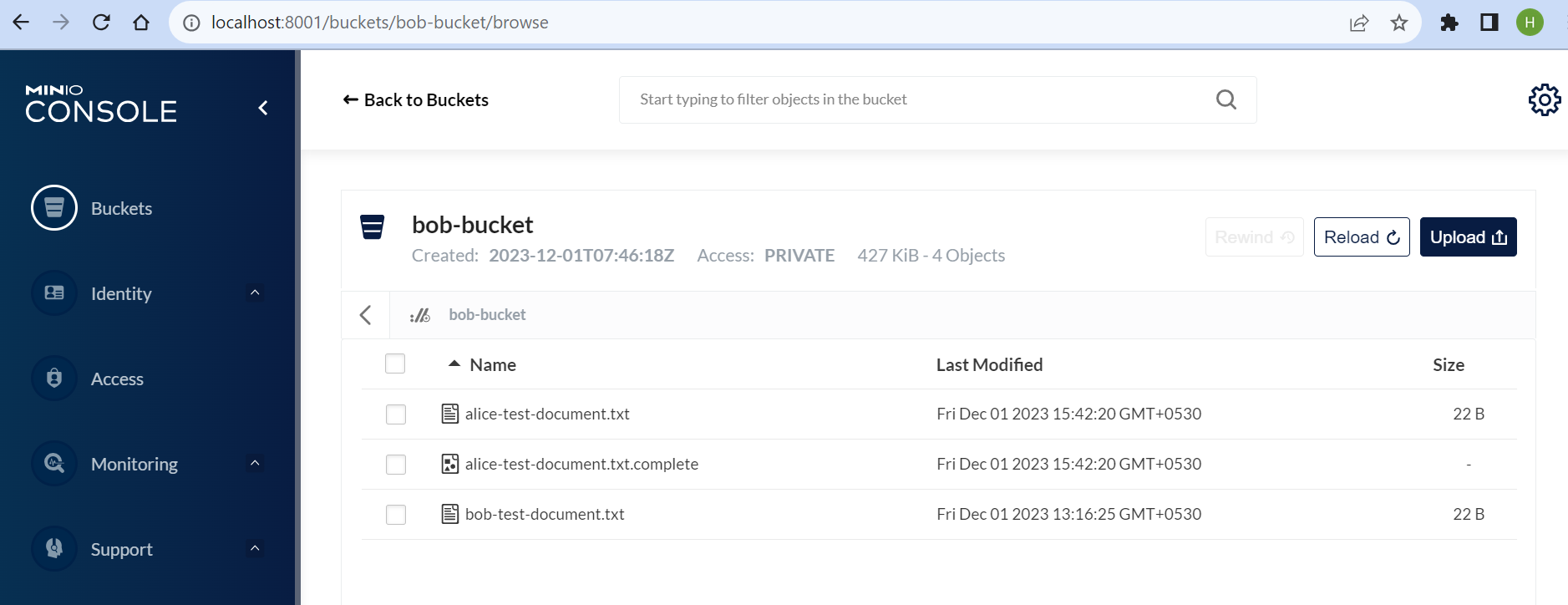
Once transfer is complete, alice-test-document.txt should be present in bob-bucket.
Open Bob's MinIO Console and browse files in bob-bucket. It should look like this.
We can also list files in bucket via AWS CLI.
First, let's configure AWS CLI to use Bob's credentials.
When prompted, enter Bob's access key id / secret. You should see list of files inbob-bucket.
 hemantxpatel
 paullatzelsperger
 AndrYurk
 ieuna
 wolf4ood
 ravinderkumarsap
 jkbquabeck
 pratapipatelbcone