File Transfer: Azure Blob Storage to Azure Blob Storage
Deprecated
This tutorial is kept for reference. It may not match the current Eclipse Tractus-X release. All tutorials
1. Description
This tutorial illustrates the process through which a provider participant can transfer a file stored in its Azure Blob Storage to another Azure Blob Storage belonging to a consumer participant.
For this tutorial, we assume Alice as a provider participant and Bob as consumer participant.
We use a self-contained version of Azure Blob Storage named Azurite, and we deploy single Azurite instance for both connectors, due to a limitation in overriding endpoints during trasfer process.
2. Existing Resources
Following resources have already been configured.
| Resource | Alice | Bob | Description |
|---|---|---|---|
| Azure Blob Storage Account Name | aliceazureaccount | bobazureaccount | Configured Azure Blob Storage Account Name |
| Azure Blob Storage Account Key | YWxpY2VhenVyZWtleQ== | Ym9iYXp1cmVrZXk= | Configured Azure Blob Storage Account key |
| Azure Blob Storage Account Key Name in Vault | aliceazureaccount-key | bobazureaccount-key | The alias under which the Azure Blob Storage Account Key has been stored in the participant's vault. This alias will be used while creating assets. It has been done to avoid leaking secret keys. |
| Azure Blob Storage Account SAS Key in Vault | aliceazureaccount-sas | bobazureaccount-sas | The alias under which a temp Azure Blob Storage Key (Shared Access Signature Key) has been stored in the participant's vault. Participants can share this key to other participants to provide temporary access to their Azure Blob Storage containers, so that other participants could transfer the files. For more details see Initiate Transfer section below. |
| Azure Blob Storage Container | alice-container | bob-container | Azure Blob Storage container to store files |
| Sample File | alice-test-document.txt | bob-test-document.txt | A sample file already uploaded in the container |
3. Connect to Azurite
To access azurite locally we need to expose the port outside our kubernetes cluster.
4. Upload file in Azurite
You can skip this step entirely if you want to use existing uploaded files.
We can upload files either via Azure Storage Explorer or Azure CLI.
4.1 Via Azure Storage Explorer
Connect to Azurite using following details.
- Account Name:
aliceazureaccount - Account Key:
YWxpY2VhenVyZWtleQ== - Blobs port:
10000
Click on the container alice-container from the tree hierarchy and upload files using Upload button.
4.2 using Azure CLI
We can upload file using Azure CLI as well.
 export ALICE_CONN_STR='AccountName=aliceazureaccount;AccountKey=YWxpY2VhenVyZWtleQ==;DefaultEndpointsProtocol=http;BlobEndpoint=http://127.0.0.1:10000/aliceazureaccount'
 az storage blob upload --container-name alice-container --file /path/to/file --connection-string $ALICE_CONN_STR
To create another container, we can run below command.
5. Create Azure Asset
While creating asset, we need to provide the file name, container where it is stored and Azure credential to access the file.
Please note, an alias (under which the real key is stored in participant's vault) in the field
dataAddress#keyNamehas been passed.curl --location 'http://localhost/alice/management/v3/assets' \ --header 'Content-Type: application/json' \ --header 'X-Api-Key: password' \ --data-raw '{ "@context": {}, "@id": "10", "properties": { "name": "alice-test-document", "description": "Product EDC Demo Azure Asset", "contenttype": "text/plain", "version": "1.0" }, "dataAddress": { "@type": "DataAddress", "type": "AzureStorage", "account": "aliceazureaccount", "container": "alice-container", "blobName": "alice-test-document.txt", "keyName": "aliceazureaccount-key" } }'
6. Create Policy
6.1 Create Access Policy
curl --location 'http://localhost/alice/management/v2/policydefinitions' \
--header 'Content-Type: application/json' \
--header 'X-Api-Key: password' \
--data-raw '{
  "@context": {
    "odrl": "http://www.w3.org/ns/odrl/2/"
  },
  "@type": "PolicyDefinitionRequestDto",
  "@id": "101",
  "policy": {
    "@type": "odrl:Set",
    "odrl:permission": [
      {
        "odrl:action": "USE",
        "odrl:constraint": {
          "@type": "LogicalConstraint",
          "odrl:or": [
            {
              "@type": "Constraint",
              "odrl:leftOperand": "BpnCredential",
              "odrl:operator": {
                "@id": "odrl:eq"
              },
              "odrl:rightOperand": "active"
            }
          ]
        }
      }
    ]
  }
}'
6.2 Create Contract Policy
curl --location 'http://localhost/alice/management/v2/policydefinitions' \
--header 'Content-Type: application/json' \
--header 'X-Api-Key: password' \
--data-raw '{
  "@context": {
    "odrl": "http://www.w3.org/ns/odrl/2/"
  },
  "@type": "PolicyDefinitionRequestDto",
  "@id": "102",
  "policy": {
    "@type": "odrl:Set",
    "odrl:permission": [
      {
        "odrl:action": "USE",
        "odrl:constraint": {
          "@type": "LogicalConstraint",
          "odrl:or": [
            {
              "@type": "Constraint",
              "odrl:leftOperand": "BusinessPartnerNumber",
              "odrl:operator": {
                "@id": "odrl:eq"
              },
              "odrl:rightOperand": "BPNL000000000002"
            }
          ]
        }
      }
    ]
  }
}'
7. Create Contract Definition
curl --location 'http://localhost/alice/management/v2/contractdefinitions' \
--header 'Content-Type: application/json' \
--header 'X-Api-Key: password' \
--data-raw '{
  "@context": {},
  "@id": "10",
  "@type": "ContractDefinition",
  "accessPolicyId": "101",
  "contractPolicyId": "102",
  "assetsSelector": {
    "@type": "CriterionDto",
    "operandLeft": "https://w3id.org/edc/v0.0.1/ns/id",
    "operator": "=",
    "operandRight": "10"
  }
}'
8. Query Catalog
Now let's verify whether Bob is able to access the assets or not via querying Alice's catalog.
curl --location 'http://localhost/bob/management/v2/catalog/request' \
--header 'Content-Type: application/json' \
--header 'X-Api-Key: password' \
--data-raw '{
  "@context": {
    "edc": "https://w3id.org/edc/v0.0.1/ns/"
  },
  "@type": "CatalogRequest",
  "counterPartyAddress": "http://alice-controlplane:8084/api/v1/dsp",
  "protocol": "dataspace-protocol-http",
  "querySpec": {
    "offset": 0,
    "limit": 50
  }
}'
You should be able to find this asset (id: 10) in the list of catalog returned by Alice.
{
  "@id": "9c1fc97a-5fcc-49f5-b56a-c78b21ca1f82",
  "@type": "dcat:Catalog",
  "dcat:dataset": [
    {
      "@id": "10",
      "@type": "dcat:Dataset",
      "odrl:hasPolicy": {
        "@id": "MTQ=:MTQ=:MTg4ZDBmN2EtZjhmNC00NjBjLWFkYjUtMDY4OTU5MDMzYjg5",
        "@type": "odrl:Set",
        "odrl:permission": {
          "odrl:target": "10",
          "odrl:action": {
            "odrl:type": "USE"
          },
          "odrl:constraint": {
            "odrl:or": {
              "odrl:leftOperand": "BusinessPartnerNumber",
              "odrl:operator": {
                "@id": "odrl:eq"
              },
              "odrl:rightOperand": "BPNL000000000002"
            }
          }
        },
        "odrl:prohibition": [],
        "odrl:obligation": [],
        "odrl:target": {
          "@id": "10"
        }
      },
      "dcat:distribution": [
        {
          "@type": "dcat:Distribution",
          "dct:format": {
            "@id": "HttpProxy"
          },
          "dcat:accessService": "fb604275-2fc6-4447-9d3e-63707c98a0db"
        },
        {
          "@type": "dcat:Distribution",
          "dct:format": {
            "@id": "AmazonS3"
          },
          "dcat:accessService": "fb604275-2fc6-4447-9d3e-63707c98a0db"
        },
        {
          "@type": "dcat:Distribution",
          "dct:format": {
            "@id": "AzureStorage"
          },
          "dcat:accessService": "fb604275-2fc6-4447-9d3e-63707c98a0db"
        }
      ],
      "version": "1.0",
      "name": "alice-test-document",
      "description": "Product EDC Demo Azure Asset",
      "id": "10",
      "contenttype": "text/plain"
    }
  ],
  "dcat:service": {},
  "participantId": "BPNL000000000001",
  "@context": {}
}
Please take a note of
odrl:hasPolicy#@id(MTQ=:MTQ=:MTg4ZDBmN2EtZjhmNC00NjBjLWFkYjUtMDY4OTU5MDMzYjg5) field in the response which will be used while initiating negotiation.
9. Initiate Negotiation
Please update offerId in the below curl request from the above step.
curl --location 'http://localhost/bob/management/v2/contractnegotiations' \
--header 'Content-Type: application/json' \
--header 'X-Api-Key: password' \
--data-raw '{
  "@context": {
    "odrl": "http://www.w3.org/ns/odrl/2/"
  },
  "@type": "NegotiationInitiateRequestDto",
  "connectorAddress": "http://alice-controlplane:8084/api/v1/dsp",
  "protocol": "dataspace-protocol-http",
  "connectorId": "BPNL000000000001",
  "providerId": "BPNL000000000001",
  "offer": {
    "offerId": "<Odrl Policy ID From Above Step>",
    "assetId": "10",
    "policy": {
      "@type": "odrl:Set",
      "odrl:permission": {
        "odrl:target": "10",
        "odrl:action": {
          "odrl:type": "USE"
        },
        "odrl:constraint": {
          "odrl:or": {
            "odrl:leftOperand": "BusinessPartnerNumber",
            "odrl:operator": {
              "@id": "odrl:eq"
            },
            "odrl:rightOperand": "BPNL000000000002"
          }
        }
      },
      "odrl:prohibition": [],
      "odrl:obligation": [],
      "odrl:target": "10"
    }
  }
}'
Above API should return below response.
{
  "@type": "IdResponse",
  "@id": "7af8b1ab-84d6-48b5-896c-09dd3a9a2ea1",
  "createdAt": 1700740699131,
  "@context": {
    "@vocab": "https://w3id.org/edc/v0.0.1/ns/",
    "edc": "https://w3id.org/edc/v0.0.1/ns/",
    "tx": "https://w3id.org/tractusx/v0.0.1/ns/",
    "odrl": "http://www.w3.org/ns/odrl/2/"
  }
}
Please take note of the negotiation id (
@idfield) in the response.
10. Get Negotiation
Now, we have initiated the negotiation. Let's try to inspect it. Please update negotiation id in the below curl request.
curl --location 'http://localhost/bob/management/v2/contractnegotiations/<NEGOTIATION_ID>' \
--header 'X-Api-Key: password'
{
  "@type": "ContractNegotiation",
  "@id": "f1bf0879-7cb5-461b-8c73-ea3957cef6aa",
  "type": "CONSUMER",
  "protocol": "dataspace-protocol-http",
  "state": "FINALIZED",
  "counterPartyId": "BPNL000000000001",
  "counterPartyAddress": "http://alice-controlplane:8084/api/v1/dsp",
  "callbackAddresses": [],
  "createdAt": 1700737605805,
  "contractAgreementId": "5fee8548-2018-4363-b417-95af486c6200",
  "@context": {}
}
statefield should beFINALIZED. If it isTERMINATED, it means negotiation has been failed. Please check logs for more details.- Take a note of
contractAgreementIdfield which will be used while initiating transfer.
11. Initiate Transfer
Now, we are about to initiate file transfer. Alice will fetch the file from its container alice-container and upload it to provided container which belongs to Bob.
11.1 Provide Temporary Access to Destination Azure Container
Since Bob doesn't want to share its Azure credentials to Alice. Hence, he generates a temporary credential and provides it to Alice.
A temporary token for both Alice and Bob has been already generated and stored in their respective vaults under aliases
aliceazureaccount-sasandbobazureaccount-sas. You can skip this step and directly refer those aliases in initiate transfer.
Using Azure CLI, we can generate a shared access signature (sas) with limited permissions and expiry.
export BOB_CONN_STR='AccountName=bobazureaccount;AccountKey=Ym9iYXp1cmVrZXk=;DefaultEndpointsProtocol=http;BlobEndpoint=http://127.0.0.1:10000/bobazureaccount'
az storage container generate-sas --name bob-container --permissions w --expiry '2030-01-01' --connection-string $BOB_CONN_STR
Above command generates a sas token with w (write) permission inside bob-container with an expiry of 2030-01-01.
For more details, see Generating SAS with Azure CLI
Now let's store this token inside Bob's vault. Don't forget to replace sas token into below command before executing.
kubectl exec -it bob-vault-0 -- sh -c "vault kv put secret/bobazureaccount-another-sas content='{\"edctype\": \"dataspaceconnector:azuretoken\",\"sas\": \"<SAS Token without quotes>\"}'"
11.2 Initiating Transfer Process
Now we are ready to initiate transfer.
curl --location 'http://localhost/bob/management/v2/transferprocesses' \
--header 'Content-Type: application/json' \
--header 'X-Api-Key: password' \
--data-raw '{
  "@context": {
    "odrl": "http://www.w3.org/ns/odrl/2/"
  },
  "assetId": "10",
  "connectorAddress": "http://alice-controlplane:8084/api/v1/dsp",
  "connectorId": "BPNL000000000001",
  "contractId": "<Contract Agreement Id from Get Negotiation Response>",
  "dataDestination": {
    "type": "AzureStorage",
    "account": "bobazureaccount",
    "container": "bob-container",
    "keyName": "bobazureaccount-sas"
  },
  "callbackAddresses": [],
  "protocol": "dataspace-protocol-http"
}'
This API should return below response.
{
  "@type": "IdResponse",
  "@id": "3c80c7cb-eff1-4538-a05a-6dcfd08f397a",
  "createdAt": 1700740670220,
  "@context": {
    "@vocab": "https://w3id.org/edc/v0.0.1/ns/",
    "edc": "https://w3id.org/edc/v0.0.1/ns/",
    "tx": "https://w3id.org/tractusx/v0.0.1/ns/",
    "odrl": "http://www.w3.org/ns/odrl/2/"
  }
}
Please take note of the transfer process id (
@idfield) in the response.
12. Get Transfer
Just wait for few seconds and check the transfer state. Please replace transfer process id before running command.
curl --location 'http://localhost/bob/management/v2/transferprocesses/<TRANSFER_PROCESS_ID>' \
--header 'X-Api-Key: password'
It should return below response:
{
  "@id": "6e81fb62-a6e1-401f-9748-cd5cbf5fa0c5",
  "@type": "TransferProcess",
  "correlationId": "6e81fb62-a6e1-401f-9748-cd5cbf5fa0c5",
  "state": "COMPLETED",
  "stateTimestamp": 1700738463944,
  "type": "CONSUMER",
  "assetId": "14",
  "contractId": "5fee8548-2018-4363-b417-95af486c6200",
  "callbackAddresses": [],
  "dataDestination": {
    "@type": "DataAddress",
    "container": "bob-container",
    "type": "AzureStorage",
    "account": "bobazureaccount",
    "keyName": "bobazureaccount-sas"
  },
  "connectorId": "BPNL000000000001",
  "@context": {}
}
Please note,
stateshould beCOMPLETED. If it isTERMINATED, it means, transfer has been failed. Please check logs for more details.
13. Validate Transfer
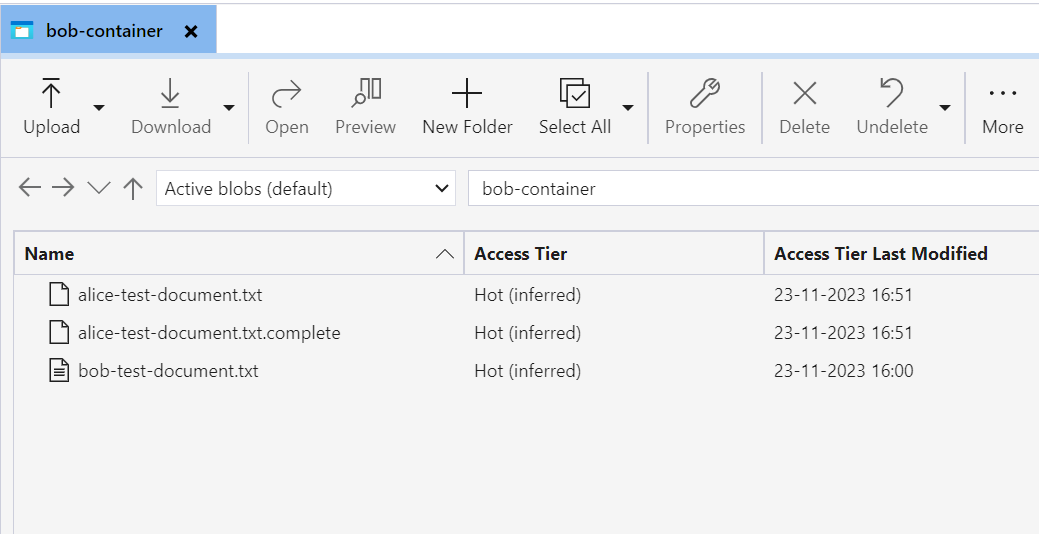
Now we can validate whether file has been transferred in bob-container or not.
Once transfer is complete, it should look like this.
We can also list files in container using Azure CLI.
 hemantxpatel
 paullatzelsperger
 AndrYurk
 ieuna
 wolf4ood
 ravinderkumarsap
 jkbquabeck
 pratapipatelbcone