Software Development View
Introduction
General Development Information
The developer view provides developers with resources to utilize the EcoPass KIT effectively. On the one side developers can learn how to integrate the EcoPass KIT into their applications and to make use of the product passport exchanging feature via the Catena-X network. On the other side, IT-Administrators will learn how to provide the needed passport data and which components are required. Thereby, this KIT covers various aspects, starting from how the available API Endpoints can be utilized for data models and how to make them available in the Catena-x Data Space.
Architecture Overview
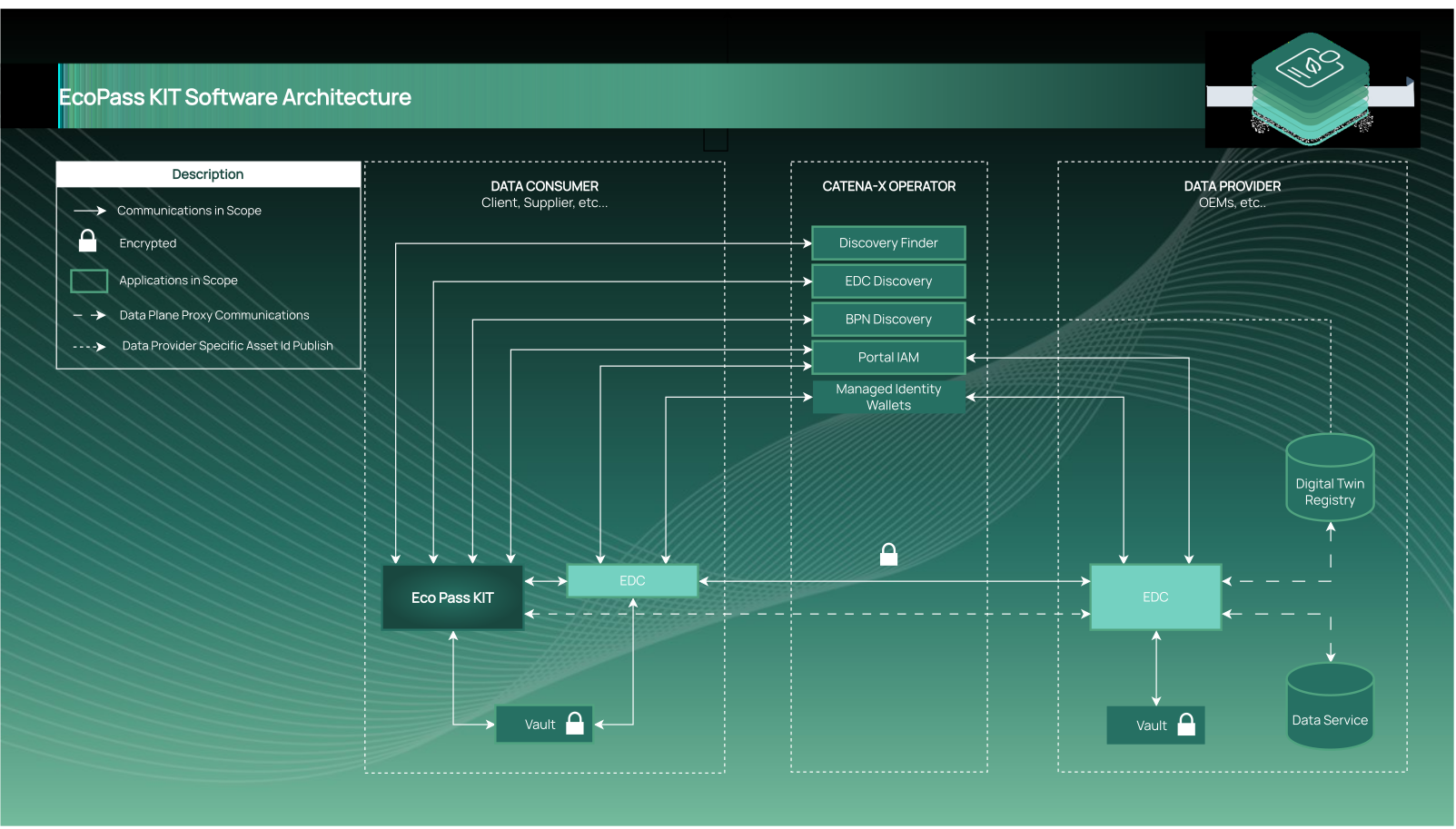
The following Figure shows how the EcoPass KIT (represented by Digital Product Passport Frontend and Backend) is embedded in the overall architecture.
Data Retrieval Flow
In order to achieve a better understanding of the EcoPass KIT data retrieval flow, we can detail a specific example where an user wants to retrieve a specific passport for a asset in Catena-X using the EcoPass KIT (reference implementation digital-product-pass).
In the data retrieval flow example below we will imagine that an user wants to retrieve the data related to a Catena-X Digital Product Pass ID he has in his product as form of QR Code and ID:
| ID | CX:XYZ78901:IMR18650V1 |
|---|
As defined in the standard CX-0096 Triangle Document for Digital Product Pass the search id used has the following semantic:
CX:<manufacturerPartId>:<partInstanceId>
| ID | Description |
|---|---|
CX | The "CX" argument is the one that indicates that this ID is a Catena-X Search Identificator. |
<manufacturerPartId> | The "manufacturerPartId" makes reference to the id type of the product. It is the identification the manufacturer gives to a specific part he produced. |
<partInstanceId> | The "partInstanceId" stands to the specific id of the product. This id needs to be registered in the digital twin from the aspect. An example value in case of batteries would be the batteryDMC_Code. |
Note: This identifications as defined in the standard MUST be added to the Digital Twin. For more information consult the Operation View Guide.
Prerequisites
In order to retrieve data in the Catena-X Network a number of services need to be available and have data register on them. Otherwise the data retrieval would simply not work because the consumer application would not "find" the specific searched asset even if it would be registered in the provider side.
| Service Name | Description | Reference Implementation | Standardized in |
|---|---|---|---|
| Discovery Finder | A microservice resolving a type of identifiers against a set of BPN-Discovery Servers. Responsible to give the search endpoints for a type of id | eclipse-tractusx/sldt-discovery-finder | CX - 0053 |
| BPN Discovery | A microservice resolving a particular assetId against the registered BPN of its owner. Responsible for indicating the BPNs for the IDs registered by the providers | eclipse-tractusx/sldt-bpn-discover | CX - 0053 |
| EDC Discovery | A microservice that resolves a BPN against an EDC endpoint. Responsible for giving the EDC endpoints of one or more BPNs | eclipse-tractusx/portal-backend - Code Implementation | CX - 0001 |
| Digital Twin Registry | An exhaustive list of all Submodel Servers, with link to their assets, adhering to the AAS Registry API. Responsible for having the Digital Twins of the provider and indicating the endpoints to the Passport Aspects. | eclipse-tractusx/sldt-digital-twin-registry OR Digital Twin KIT | CX - 0002 |
| Submodel Server | The data source adhering to a subset of the Submodel API as defined in AAS Part-2 3.0. Where the Passport Aspects are stored | FA³ST-Framework, Eclipse Basyx, AASX Server | CX - 0002 |
| EDC | Main gateway to the network. In this use case two EDC need be existing, one connected to the Digital Product Pass (EcoPass KIT) [EDC Consumer] and another to the Provider Catena-X components [EDC Provider] | eclipse-tractusx/tractusx-edc | CX - 0018 OR Connector KIT |
| Digital Product Pass | The [EcoPass KIT] reference implementation. The application responsible for retrieving the passports and interacting with the services listed above. | eclipse-tractusx/digital-product-pass | CX - 0143 |
Note: The diagrams match the architecture proposed in the deprecated reference application Arc42 and Data Retrieval Guide. Using the discovery services from Catena-X
Here is a diagram of the data retrial flow necessary to retrieve any data from the Catena-X Network without any optimizations:

1. Discovery Phase
At the beginning we start calling the Discovery Service which is responsible for giving us the urls from the BPN Discovery and the EDC Discovery this two service give us first a BPN or Business Partner Number for a specific id and the EDC Discovery will give you a list of EDC registered by one company's BPN.
2. Digital Twin Registry Search Phase
Once we have a list of EDCs we need to find which of this EDCs contain the Digital Twin Registry component. We can filter which EDCs contain the Digital Twin Registry by simply calling for the catalog with the type condition of the contract that must have the data.core.digitalTwinRegistry standardized type.
Once we have the list of DTRs we need to negotiate each contract retrieve in the catalog so that we can have the Contract Agreement Id which is given by the EDC once the contact is signed and agreed. This id will be used later to request the transfer for the EDR token for accessing the Digital Twin Registry through the EDC Provider Data Plane Proxy.
3. Digital Twin Search Phase
We need to search for the Digital Twins inside of the Digital Twin Registries, and once we found it we can start the negotiation for the submodelDescriptor we are searching for that can be for example a: Digital Product Pass, Battery Pass, Single Level BOM as Built or a Transmission Pass.
4. Data Negotiation and Transfer Phase
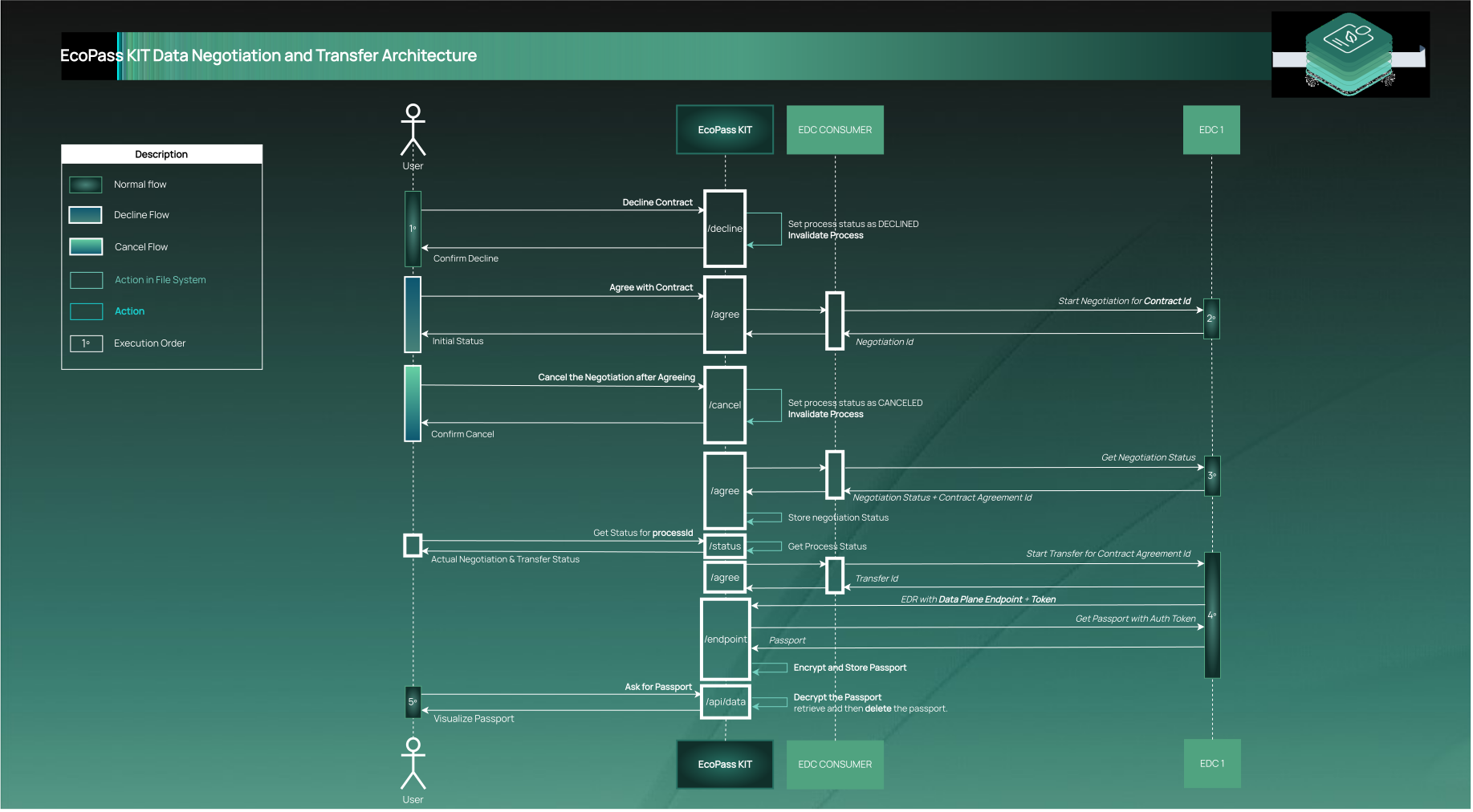
Once we have the submodel we are going to call the [subprotocolBody] url of the endpoint interface with name SUBMODEL-3.0. This will provide for us the asset id to negotiate with the EDC Provider. Once this asset is negotiated we will request for the transfer and EDR token will be sent to the backend by the EDC Provider, allowing us to query the dataplane url contained in the href field of the endpoint interface. And in this way we will retrieve the data using the EDC Provider Data Plane Proxy.
Technical Detailed Phases
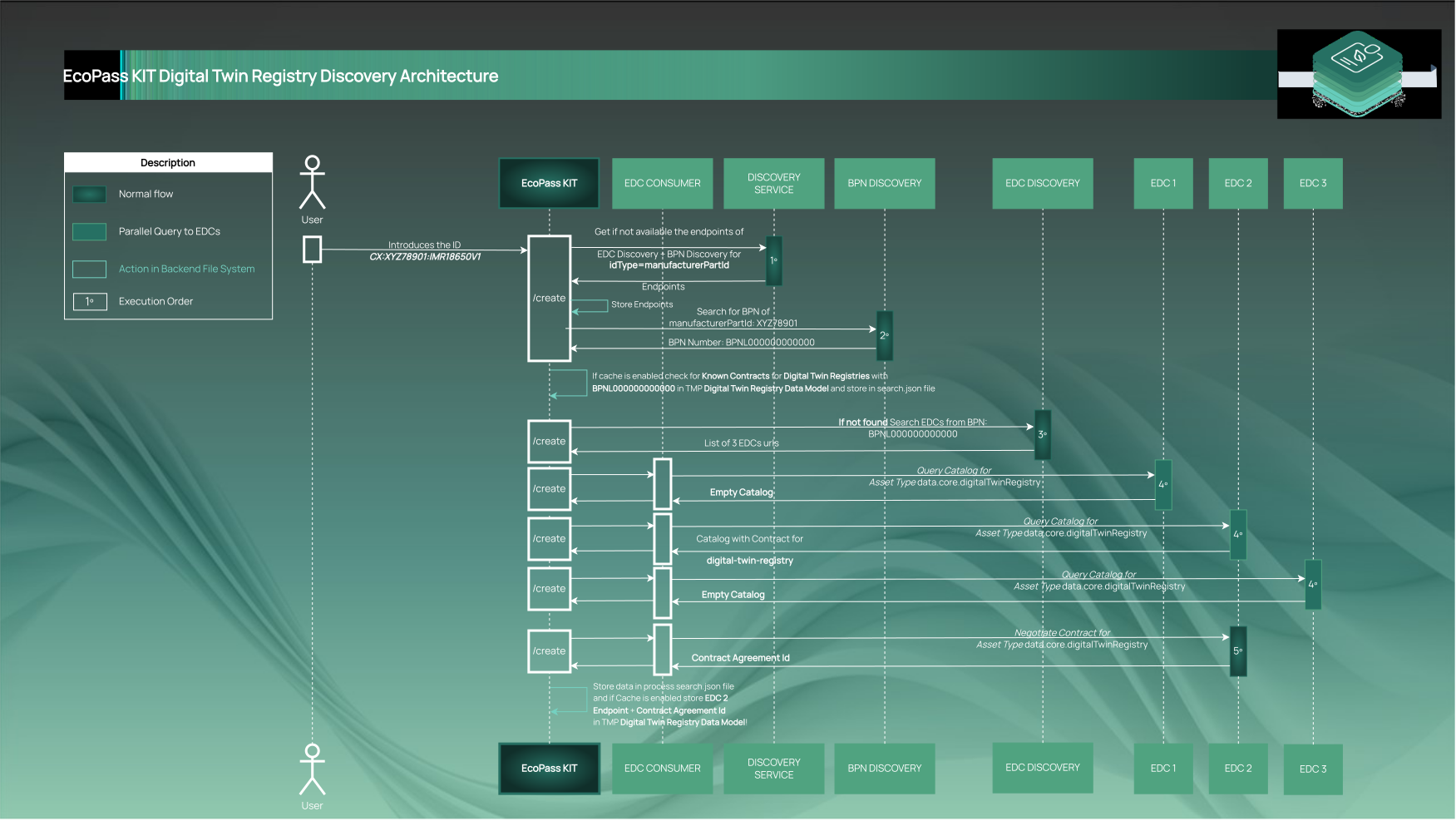
1. Discovery Phase + 2. Digital Twin Registry Search Phase
At the discovery phase the digital product pass application (EcoPass KIT) will search in the Discovery Service for the following keys:
| Key | Service Name |
|---|---|
| bpn | EDC Discovery Service |
| manufacturerPartId | BPN Discovery Service |
By searching for this keys the application will find the necessary services and will be able to search for the information needed to start the search for digital twin registries.
After the discovery phase, the search for digital twin registries is one of the core phases to be done when retrieving data in Catena-X. It is necessary for filtering the EDCs which contain the digital twin registry assets, allowing an optimized search without high waiting times.
Once the negotiation for the digital twin registries assets are done we would be able to retrieve a catalog for the user to search the serialized Id (key: partInstanceId, example value: batteryDMC_code).
Prerequisites for Discovery Phase + Digital Twin Registry Search API
The following information is required to enable the decentralized search for digital twin registries:
| Name | Example | Description |
|---|---|---|
| Search Id Type | manufacturerPartId | The search id type is required first of all to know in which BPN Discovery services to search. After this same id will be introduced in the Discovery Service and we will obtain a list of BPN Discovery Endpoints. After this same id will be introduce as the type attribute in each BPN Discovery. |
| Search Id Value | XYZ78901 | The search id value is required for searching in the BPN Discovery services. One example could be the product type id of a company, which is owned by an unique BPN reducing the complexity of the search. |
Sequence Diagram
This sequence diagram represents the digital twin search and the discovery phases. For more information go to explanation
NOTE: For learning how to register the assets and the digital twin registry and operate the EcoPass KIT visit the Operation View
3. Digital Twin Search Phase Details
The digital twin searching phase involves searching in every digital twin registry for the desired digital twin asset. In this digital twin we will find the necessary information for requesting the contract information for the "digital twin submodels".
Prerequisites for Digital Twin Search API
The following information is required for enabling the digital twin search, in order to start the data transfer phase:
| Name | Example | Description |
|---|---|---|
| Specific Asset Id Type | partInstanceId | The specific asset id type is used to search in the digital twin registry for a specific digital twin. It is basically the name of "specificAssetId" object located at the digital twin specificAssetIds property. The *partInstanceId* is used as an example most of the time, since the digital twin registry implemented a hotfix that allows companies say who can access to their partInstanceId fields. Now allowing the "PUBLIC_READABLE" property. |
| Specific Asset Id Type | IMR18650V1 | The specific asset id value is added in the digital twin lookup when calling the EDC Provider Proxy. It basically points to the value of the Specific Asset Id Type property. |

4. Data Negotiation and Transfer Phase Details
The Data Negotiation and Transfer Phase is the phase responsible for the final data transfer and negotiation. In this phase we retrieve the data using the EDC.
Prerequisites for Negotiate and Transfer API
The following information is required for enabling the digital twin search, in order to start the data transfer phase:
| Name | Description |
|---|---|
| Contract with Policy | To start the contract negotiation we need to agree on a policy for the a specific contract. This needs to be selected by the one that is requesting the data. |
Sequence Diagram for Negotiate and Transfer
Authentication and Authorization
The authentication is administrated by the IAM Services from the Portal defined in the CX - 0001 Standard
The backend APIs are authenticated by using a JWT Token in the request as Bearer token. The frontend is responsible for obtaining this token in the portal federated IAM.
The EcoPass KIT has two authorization methods:
| Authorization Type | Description |
|---|---|
| Portal Roles | Each digital product pass application contains an specific "AppId" provided by the portal in the Marketplace registration. And this Id shall be added to the configuration of the DPP Application in order to authenticate the user. If the end user contains any role added in the portal it will have access to the application if enabled. |
| Business Partner Number (BPN) | The digital product pass application contains a check for the "BPN" of the end user. An option is also to allow the user to login if he is belonging to the company of the configured "EDC" so no user can act in name of a specific company. |
NOTE: The authorization can be configured in the EcoPass KIT configuration so that it matches the business interests of the operator.
For more information on how the Authentication & Authorization is done consult the reference implementation Digital Product Pass Arc42
Reference Implementations
[!NOTE] The reference application has been deprecated. You can find the old source at eclipse-tractusx/digital-product-pass. Similar development is happening for the Industry Core Hub.
NOTICE
This work is licensed under the CC-BY-4.0.
- SPDX-License-Identifier: CC-BY-4.0
- SPDX-FileCopyrightText: 2023, 2024 ZF Friedrichshafen AG
- SPDX-FileCopyrightText: 2023, 2024 Robert Bosch GmbH
- SPDX-FileCopyrightText: 2023, 2024 Bayerische Motoren Werke Aktiengesellschaft (BMW AG)
- SPDX-FileCopyrightText: 2023, 2024 T-Systems International GmbH
- SPDX-FileCopyrightText: 2023, 2024 SAP SE
- SPDX-FileCopyrightText: 2023, 2024 CGI Deutschland B.V. & Co. KG
- SPDX-FileCopyrightText: 2023, 2024 Fraunhofer-Gesellschaft zur Förderung der angewandten Forschung e.V. für ihre Institute IPK und IPK
- SPDX-FileCopyrightText: 2023, 2024 BASF SE
- SPDX-FileCopyrightText: 2023, 2024 Henkel AG & Co. KGaA
- SPDX-FileCopyrightText: 2023, 2024 Contributors to the Eclipse Foundation
- Source URL: https://github.com/eclipse-tractusx/digital-product-pass