Architecture
Overview
This document is intended to give a detailed description of the interactions within the dataspace on several levels. This involves interactions on the protocol level as well as the interactions of all the components involved during a data transfer.
DSP Interactions
The dataspace protocol suggests a Connector, which implements the state machines and interactions patterns specified in the protocol. The protocol introduces the separation into two distinguished concepts, the Control Plane, which implements the protocol interactions, basically implementing the connector, and a Data Plane, which is a virtual concept that realizes the data transfer with a specific transfer protocol. The control plane as such is a static concept which can be implemented and used in multiple transfer scenarios. The data plane is a general name for any technology used to execute the transfer of data. It is provided in multiple facets in order to implement different data transfer types, like standard http rest api access, transferring binary large objects, or continuous data streaming.
The Dataplane Signalling API describes an api offered to be used for the interactions between the control and the data plane. Each data plane following this proposal has to implement this api in order to have a standardized information exchange. Currently, Dataplane Signalling is a specification developed in the context of the Eclipse Dataspace Working Group. An earlier internal version is used for the interaction within the existing reference implementation. The api as such is a proposal for the interaction, but it is no necessity for an implementation to solve the interaction between the control plane and a specific data plane.
The following sequence diagram shows the general interaction patterns of the control plane and data plane, explained afterwards in more detail.
The general interaction pattern is driven by the Dataspace Protocol which defines three levels of interaction:
-
Catalog Request: The catalog request provides to the consumer a list of available service offerings. The catalog thereby is a DCAT catalog that provides a list of Datasets which again provides at least one Distribution object representing a specific transfer technology. A Dataset describes a concrete data offer with relevant metadata, like the type of data, transfer technology, api type and the Usage Policy also known as Contract Policy under which the data is offered for usage. The dataset provides a starting point to initiate the contract negotiation.
The catalog only contains service offers which are accessible by the requesting consumer. When defining service offers, the provider in addition to the usage policy has to define an Access Policy, which is basically a filter applied by the provider connector during the creation of the catalog. The access policy typically limits access to a defined dataset, so that only legitimate consumers can see the offer in the provided catalog.
The catalog request is synchronous and returns with the catalog in the response.
-
Contract Negotiation: Access to a service offer is provided via a contract, which is basically an agreed upon usage policy.
A contract negotiation is an asynchronous process, initiated by a consumer using a Contract Request message. The request is processed by the provider connector and later by the consumer connector. The process terminates when both connectors reach the state Verified which shows a successful negotiation process or reach the state Terminated which indicates issues and the contract negotiation failed. After the contract has reached state Verified, the contract is established and Transfer Processes can be initiated.
The necessary information needed to start a negotiation is provided in a dataset. This includes the endpoint to call for initiating the negotiation and the usage policy that is the contract proposal for the consumer to gain access. Based on this information, a consumer starts the contract negotiation process by calling the corresponding endpoint.
-
Transfer Process: To initiate a transfer, a Transfer Process needs to be created. Again, this is an asynchronous process that is started by a Transfer Request message sent by the consumer connector. The provider connector answers with a Transfer Start message, which synchronizes the transfer process state so that both connectors see the process in status Started. Depending on the transfer direction, one of the exchanged message is used to transfer the access information, so that the active part can transfer the data to the correct sink.
-
In a pull transfer, the consumer is the active part and initiates a request to the contracted service. The typical example for this is using a REST API. In this case, initiating a transfer process results in the return of a data structure called Endpoint Data Reference (EDR). It contains all necessary information to access the intended resource server, i.e., the endpoint url and the necessary access token. In the Tractus-X connector, the EDR contains refresh information, i.e., the endpoint url and the refresh token to renew the access token if expired.
-
In a push transfer, initiating the transfer ends with the provider to be actively pushing data to a consumer owned data sink. This can be a cloud storage service to which data is send. To enable the provider to send the data, the access information, i.e., the endpoint url of the sink and the access credentials have to be provided by the consumer in the transfer process request.
A transfer process can be suspended or completed which is represented by a corresponding state. In case of an error the state is transitioned to state Terminated. A suspended transfer process can be resumed, during suspension, no access to the data is possible.
-
After the transfer process is started, the data plane is responsible for the data transfer, i.e., it mediates between the consuming service and the providing service to get the data transferred. The data plane is a transfer technology specific implementation that connects an existing technology to the concepts of the dataspace concept. The technology specific information on data endpoints used and access information needed are part of the transfer process creation.
The contract data model
The following diagram shows the dependencies between the data objects created for and during a data transfer:
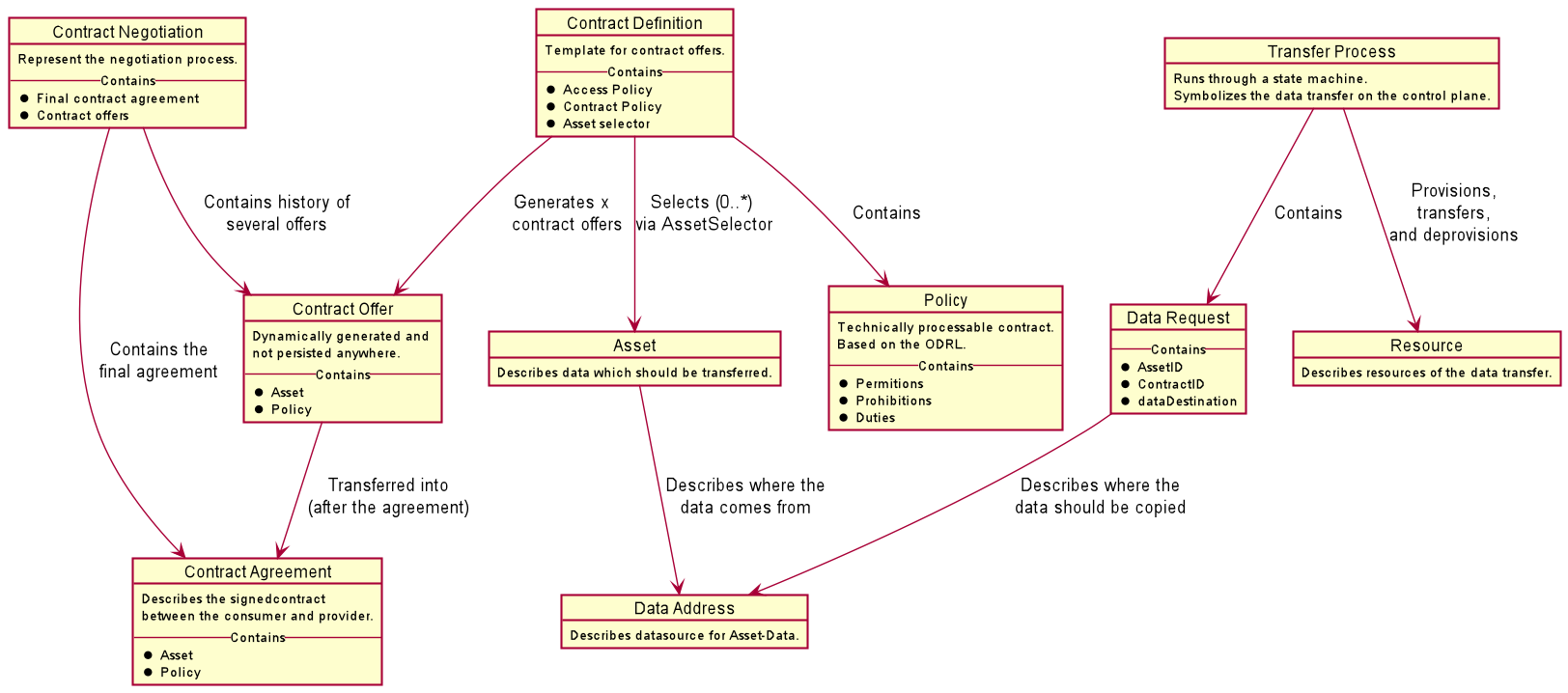
It summarizes the description above into objects and dependencies. At the core is a Contract Definition created by a provider in its connector. It references an Access Policy and a Contract Policy of type Policy and an Asset which defines the service offering referring furtheron to the Data Address which is the concrete resource description that provides the offer.
During a catalog request, the Contract Definition id transferred into a concrete Contract Offer that is added in the form of a Dataset in the provided catalog. A consumer starts a Contract Negotiation, referring to one of the provided Contract Offers and eventually, both connector agree on the contract which leads to a Contract Agreement that is an immutable representation of all relevant details concerning the contract.
Afterwards, Transfer Processes refering to such a Contract Agreement can be initiated. The Transfer Process refers to a Data Request which summarizes the transfer metadata including a reference to the Data Address to connect to the concrete offering and Resource objects necessary for the transfer.
Interaction Overview
The following figure shows the involved services and the basic interaction between the services in this case in a Pull scenario.
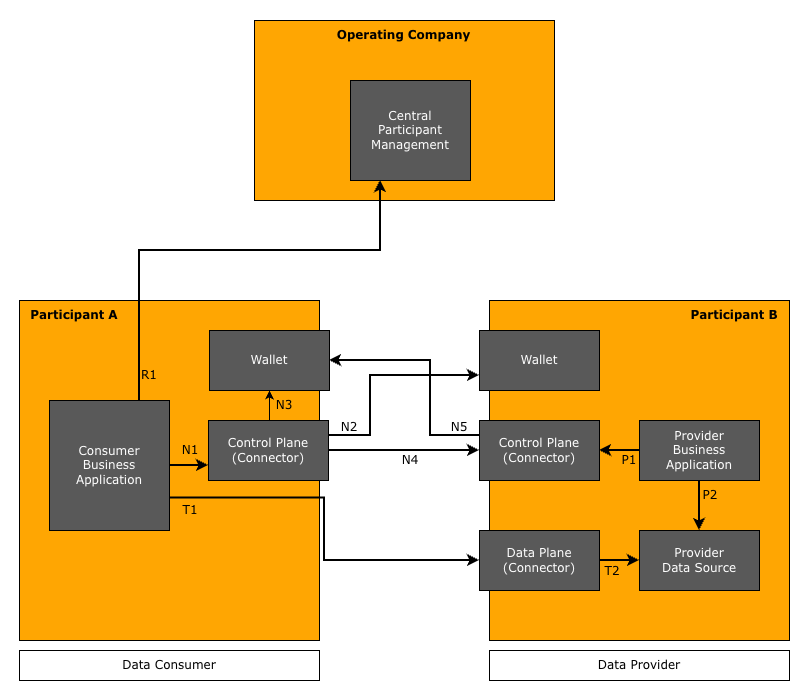
The figure shows the interaction between a consumer Participant A and a provider Participant B. In the following, the different interactions are described in detail.
The first interaction is done on the provider side, by preparing the data and creating the contract definition to offer the data to potential consumers.
-
P1: Manage the data offers and policies. Build contract definitions by combining offered data with an usage and an access policy.
-
P2: Provide the data according to the offered contract definitions and in the transfer type technology used, e.g., operate a resource server like a Digital Twin Registry.
With these steps, data is available and offered in a way that it can be found by consumers and access can be negotiated. The Provider Business Application is a service that allows to manage provided data, e.g., manually or for larger setups, by automation of translating data created in an internal IT system into the required data structures.
The data transfer is initiated at the consumer. If the consumer does not have the necessary details, to initiate the transfer, he has to check some centrally operated services (step R1), that provide him with the necessary identifiers to initiate the decentral data transfer.
Catena-X: In the case of Catena-X the identifiers are the BPNL and the DID. The Central Participant Management is provided by a service called BDRS (BPN-DID Resolution Service). It is implemented in a way that it is impossible to track the concrete interest in a company. In case of the BDRS this is ensured by returning a list of all known mappings between BPNLs and DIDs. It is a local mechanism in the consumer connector to identify the concrete mapping needed in a certain situation. In addition, in Catena-X the Business Partner Data Management (BPDM) provides a management infrastructure, that allows to search for companies by name and other properties in order to retrieve a BPNL which builds the basis for interactions in the dataspace.
Based on the identifiers, the data transfer can be negotiated. This is done with the following steps:
-
N1: The Consumer Business Application initiates at the consumer Control Plane the execution of a request as defined in the Dataspace Protocol.
-
N2: The consumer Control Plane uses the provider's DID to access the corresponding DID document. Since Catena-X uses the DID:WEB method, the control plane uses the URL in the DID to identify the endpoint at which the DID document is hosted.
The DID document contains a service section which contains references to connector endpoints which are used in subsequent steps of the interaction.
The whole step can be omited if the DID document and correspondingly the endpoints are already known to the consumer.
-
N3: To initiate a DSP request, the consumer Control Plane has to provide an access token, that allows the providers Control Plane to retrieve verifiable credentials in order to check whether the request is valid and all prerequisites are met. This token is provided an Secure Token Service which is typically hosted by the consumer's Wallet.
-
N4: The consumer Control Plane executes the intended DSP request by calling the corresponding DSP endpoint at the provider Control Plane. With the request, the consumer sends the token retrieved in step N3.
Depending on connector implementations involved, there might be the need to identify the DSP protocol version to be used by the interaction. For that, the consumer typically has to identify the version supported by the provider connector and then to use the latest version supported on both sides. To provide information on supported versions any connector offers a /.well-known/dspace-version endpoint as subendpoint of the connectors base path.
-
N5: The provider Control Plane retrieves the verifiable presentation (containing the relevant verifiable credentials) necessary to validate the legitimacy of the request by calling the consumer's Wallet of the consumer using the token created in step N3. The control plane gets access to the credentials and checks their validity. In addition, the control plane checks whether all other conditions like further policy constraints are met, and, if successful, executes the request and provides an appropriate response to the consumer control plane.
The steps N1 to N5 are bascially the same for every DSP call, be it to request the catalog, to initiate a contract negotiation or to start a transfer request. The Consumer Business Application executes the required DSP requests in the appropriate order basing the next request on data received in the previous request. In the day-to-day business situations, the dominating action on DSP level is the management of transfer requests, as the catalog retrieval and the contract negotiation are only necessary, if access to a new data offering is required. If the concept is applied efficiently, such requests are the exception, as most data can be retrieved using existing contracts.
The final step is the concrete data transfer, after the Transfer Process is started. The figure shows the standard pull case, where the Consumer Business Application has received an access token which is used to access the provided resource. In the current setup, the access is controlled by the Data Plane of the provider, i.e., the data plane service acts as a proxy that receives the request (step T1) and forwards it to the actual Data Source (step T2). On the way back, the data is again forwarded by the Data Plane to the calling Business Application.
In the push case, the transfer is immediately executed when a Transfer Process is started on DSP level. The Control Plane of the provider initiates the data transfer by providing the request to the Data Plane. The Data Plane uses the given access information to copy the requested data object from the data source to the consumer given data sink. In the finite case, it terminates the Transfer Process. The new infinite push transfer keeps the Transfer Process open and, initiated by the availability of new data, executes another push of the new data object to the consumer provided data sink.
Discovery of Connectors
The discovery of connectors is organized in a decentral manner. It is executed in step N2 above by retrieving the DID document of the provider. A DID document is public and can be accessed by anyone who has knowledge of the corresponding DID.
The DID document has the following structure. For the discovery, the service section is relevant, as it contains one or multiple DataService entries that point to a specific endpoint of a connector. As the connector described in this KIT supports in general multiple versions, this feature of the DSP spec has been selected to be used for discovery. An entry has this structure:
{
  ...
  "service": [
    {
      "@context": [
        "https://w3id.org/dspace/2025/1/context.jsonld",
        "https://www.w3.org/ns/did/v1"
      ],
      "type": "DataService",
      "serviceEndpoint": "https://subdomain.provider-domain.com/subpath/.well-known/dspace-version",
      "id": "did:web:provider-domain.com#dsp-agent-1"
    },
    ...
  ],
  ...
}
The referenced endpoint is actually pointing to a specific version metadata endpoint to be found as seen in the
serviceEndpoint field in the above DID document example. The endpoint is provided at the subpath
/.well-known/dspace-version attached to the connector base path. It contains a data structure like this:
{
  "protocolVersions": [
    {
      "version": "2025-1",
      "path": "/2025-1",
      "binding": "HTTPS"
    },
    {
      "version": "v0.8",
      "path": "",
      "binding": "HTTPS"
    }
  ]
}
The structure implies, that different DSP versions are offered in separate subtrees of a connector. The path property
contains the subpath added to the connector base path that builds the root of the DSP endpoint subtree of the corresponding
version.
Typically, it is expected to support always the latest agreed upon DSP version in a connector, but for backward compatibility reasons, some connectors must be capable to communicate with multiple version of the DSP. Accessing this version metadata endpoint allows the consumer connector to determine the supported DSP versions as mentioned in step N4 above. Based on this information the connector can decide on the version to be used for the interaction with the provider connector.
Service entries in the DID document
The DID document is typically something managed by the wallet. As it is basically a JSON structure with a clear semantics, e.g. the SAP DIV wallet provides concrete endpoints to manipulate the content of the different sections of the DID document. An operation infrastructure for connectors has to implement a mechanism to register new connector offerings and to deregister a connector when it is decommisioned.
E.g. in the latest version 0.12.0 of the Eclipse Tractus-X connector reference implementation, there is a mechanism that ensures during startup the existence of the entry in the DID document referenced by the participant id. It is also possible to configure the removal of the entry on shutdown, which has to be used with care, as not always when a connector shuts down, the removal of the entry makes sense.
Notice
This work is licensed under the CC-BY-4.0.
-
SPDX-License-Identifier: CC-BY-4.0
-
SPDX-FileCopyrightText: 2026 Cofinity-X GmbH
-
SPDX-FileCopyrightText: 2024 Contributors of the Eclipse Foundation